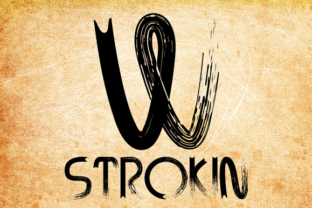
Strokin: A Distinctive Display Font for Custom Typography
Fonts are rarely described as messy, inky, or charcoal-like by design, but Strokin (styled as STROKIN in its full uppercase identity) earns those descriptors without apology. This display typeface deliberately breaks away from the polished, sterile letterforms that dominate much of contemporary digital design. Instead, it leans into the raw, tactile textures of paint strokes and charcoal marks. When used in lighter tones, it mimics chalk on a rough surface; add red, and the same glyphs evoke smears of blood. This is a font with character, yes, but also with a specific purpose. For designers, content creators, and brand owners who need something that feels hand-crafted, unpredictable, and visceral, Strokin offers a rare combination of technical sophistication and deliberately imperfect aesthetics.
What Makes Strokin Different
At first glance, Strokin looks like something you might produce by dipping a brush in ink and pressing it to paper—then immediately scanning the result before the strokes dry. The letterforms are uneven, textured, and full of small irregularities that make each character feel like a one-off mark. Yet beneath this apparent spontaneity lies careful OpenType coding. The font includes interlocking letter pairings that activate automatically, creating a more randomized, bespoke appearance across your copy. This is not a font that repeats the same shapes over and over; adjacent letters connect, overlap, or sit at slightly different angles depending on the context. The result is a text block that looks genuinely organic, as if written by hand rather than typeset.
The character set is another practical strength. Strokin includes glyphs for multiple languages, covering those “extra pesky foreign features” (accents, diacritics, and extended Latin characters) that many decorative display fonts omit. If your project requires multilingual headlines—common in publishing, advertising, or global branding—this font removes a significant compatibility hurdle. You get the rough, expressive look without sacrificing language support.
Real-World Performance: Where Strokin Shines
In practical use, Strokin’s strengths emerge most clearly at larger sizes. This is a display font meant for headlines, titles, logos, posters, and any setting where letterforms themselves are part of the visual message. At 48 points or larger, the texture becomes legible and the interlocking pairings create a lively rhythm. At text sizes below 24 points, the messy details begin to interfere with readability, especially in body copy or dense paragraphs. That is not a flaw—it is a deliberate design boundary. Using Strokin for short, impactful lines respects its nature. Trying to use it for long-form reading would frustrate both the viewer and the message.
Digitally, Strokin works well on web banners, social media graphics, and video title cards, provided the background is not overly busy. Because the font itself carries strong visual noise (the ink splatters, uneven edges, and variable stroke weights), it pairs best with clean, minimal settings. A dark charcoal Strokin headline on a light, flat background reads clearly while retaining its gritty character. Reversed in white or light gray on a dark background, it shifts tone entirely—becoming chalk-like and softer, but still unmistakably hand-drawn. The red variant, as noted, pushes into horror or gritty editorial territory, but that association is worth being deliberate about.
Usability and Flexibility Across Media
Strokin is an OpenType font, which means it works across all major design software (Adobe suite, Affinity, web font services, and most print layout tools). The automatic ligatures and interlocking pairs require OpenType support in the application, but that is now standard even in basic tools like Canva or Figma (with appropriate licensing). Installing the font is straightforward: download, activate, and it appears in your font menu. There is no additional setup needed for the interlocking feature, which activates by default when the software supports contextual alternates.
One of the more useful aspects of Strokin’s design is its flexibility in mood. Depending on the color, background, and surrounding elements, the same character can read as dirty, elegant, ominous, or playful. This tonal range means you can reuse the font across different projects without your audience feeling they have seen the same look twice. A minimalist fashion brand might use Strokin in a light gray for a subtle, hand-drawn luxury feel, while a horror-themed event poster might go for bold red letters on black. The font does not lock you into one genre, though it does lean toward an edgy, unrefined aesthetic.
For packaging design, especially for artisanal or small-batch products, Strokin can convey authenticity and handcraft. Think of a label for a small-batch hot sauce or a craft beer: the irregular inky strokes suggest human involvement rather than industrial precision. The same applies to editorial work—magazine covers, feature spreads, or chapter titles in books that need a tactile, literary feel. Educators and serious hobbyists creating printed zines or online courses might also benefit, as the font adds visual texture without requiring custom hand-lettering skills.
Who Should Consider Strokin
Professional designers and art directors who need a display font with authentic hand-drawn texture will find Strokin a reliable tool. It saves hours of scanning actual brush strokes and cleaning them up—the typeface already includes hundreds of character combinations with organic overlap. For freelancers and small business owners, the font offers a way to differentiate branding without a large budget for custom lettering. A single purchase gives you a full character set with multilingual support, suitable for logos, signage, and social media templates.
Publishers and marketers working on short-form content (headlines, quotes, calls to action) can rely on Strokin to create immediate visual impact. The font’s unpredictability actually works in its favor here: because no two letter pairs sit exactly the same, each headline has a unique feel, reducing the “templated” look that plagues many digital campaigns. Bloggers and content creators who want a memorable title or subtitle for video thumbnails will also appreciate the bold, imperfect presence Strokin brings.
However, Strokin is not ideal for everyone. If your work demands neutrality, high legibility at small sizes, or a clean modernist appearance, this font will fight you. It also requires thoughtful color and background choices. A cluttered background combined with the font’s built-in texture can become unreadable. Similarly, for formal or corporate communications where consistency and polish are paramount, Strokin’s messiness may be the wrong signal. It is a tool for specific expressive needs, not a universal substitute.
Practical Limitations and Considerations
No font is without compromise. Strokin’s interlocking pairs, while clever, can occasionally create unexpected overlaps that look more accidental than intentional. Designers should preview headlines at actual usage size and adjust kerning if needed. The OpenType alternates produce a randomized effect, but some letter combinations may not interlock as elegantly as others. This is part of the “bespoke” character but also means you cannot fully control the final look. If you need perfect alignment or consistent spacing, Strokin will frustrate you.
Another point: because the font is heavily textured, it does not compress well in lossy image formats (like JPEG) at low resolution. Fine details blur or create artifacts. For digital use, export at high resolution or use PNG for graphics. For print, ensure your printer can reproduce the subtle ink-splatter-like edges. On screen, test the font at various sizes and on different displays—what looks like a pleasing rough stroke on a Retina screen may appear muddy on a standard monitor.
Licensing is another practical factor. Strokin is a commercial font, likely available through platforms like MyFonts or similar. The standard desktop license covers most branding and print projects, but check for web font and app embedding rights if you plan to use it on a website or in a mobile interface. Like any OpenType font, it is not free, but given its uniqueness and language support, the cost is reasonable for professionals who need this specific aesthetic.
Long-Term Value and Final Observations
Strokin is not a font you will use every day. It is a specialist tool, best deployed for projects where visual tone matters more than legibility. But for those projects, it delivers a level of authenticity that polished fonts cannot match. The OpenType coding ensures consistency in its inconsistency, and the multilingual support widens its usefulness beyond English-only design. Whether you are a marketer launching a gritty campaign, a freelancer building a brand identity for a craft client, or a publisher seeking a distinct headline face, Strokin offers a practical, well-crafted solution that respects both the art of typography and the realities of production.
In a world where many display fonts rely on clean vector edges, Strokin stands apart by embracing imperfection as a feature. It does not try to be everyone’s font. Instead, it serves a clear niche with competence and character. If your work involves storytelling through type—and you want each character to feel like a mark made by hand—this font warrants your consideration. Use it at the right size, on the right background, and it will reward you with an organic, memorable presence that few digital fonts can replicate.