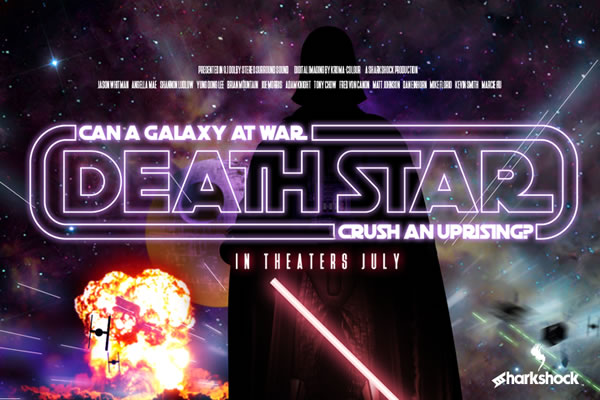
The Death Star Font: A Retro Typographic Force for Modern Projects
For decades, fans of the epic space saga set in a distant galaxy far, far away have searched for the perfect typeface to capture that iconic sci-fi aesthetic. Before the rise of easily accessible display fonts, hobbyists and designers alike faced a galaxy of limited options. Whether you were crafting a fan blog, designing a logo for a local comic convention, or printing custom t-shirts for a viewing party, finding a font that truly felt authentic was a challenge. Then came a typeface that answered the call: Death Star. This grotesque display font, with its all-caps character set, channels the spirit of classic 80s design in a way that feels both nostalgic and freshly relevant. If you have been searching for that perfect retro touch, patience you must have, young Jedi, and thank me later you will.
The beauty of Death Star lies not just in its thematic name, but in its meticulous design. It is a grotesque display font, meaning it belongs to the family of sans-serif typefaces that emerged in the early 19th century and later exploded in popularity during the 1980s. What sets this particular font apart is its geometrically rounded curves and limited stroke width variation. The result is a clean, approachable, and decidedly retro look that avoids feeling overly harsh or mechanical. Instead, the rounded corners soften the overall impression, making it versatile enough for headlines, badges, and short-form text without losing its bold personality.
Why the Death Star Font Works for Modern Branding and Design
In a world saturated with minimalist and neutral typefaces, Death Star offers a distinct voice. Its all-caps structure demands attention, making it an excellent choice for logos and branding that need to convey strength, nostalgia, or a playful sense of adventure. The font is particularly effective for projects targeting audiences who appreciate retro aesthetics, whether that is a vintage arcade bar, a sci-fi podcast, or a line of apparel inspired by 80s pop culture.
One of the most practical benefits of this typeface is how it performs at larger sizes. The kerning is extremely tight, which means the letters sit close together, creating a cohesive and almost monolithic block of text. This is ideal for poster design or hero images where you want the title to dominate the visual field. However, because of this tight spacing, the font is best displayed at larger sizes. When used for body text or small captions, the letters can become too dense, compromising readability. For maximum impact, reserve Death Star for headings, titles, and prominent calls to action.
Exploring the Technical Features: Alternates, Ligatures, and Glyphs
A common question among designers evaluating a new typeface is whether it offers enough flexibility to feel customized. Death Star delivers on this front with a generous selection of alternates and ligatures. These are special character variations that can replace standard letters or combine two or more glyphs into a single, visually pleasing unit. For instance, certain letter pairings like "ff" or "tt" may have specific ligature versions that enhance the retro feel. The font includes a helpful poster that showcases all available alternates and ligatures, so you can quickly identify which variations will work best for your project.
To access these alternates, you will need a program that supports OpenType features (OTF). Most modern design software, including Adobe Illustrator, InDesign, Photoshop, and Affinity Designer, have robust OpenType panels. In these programs, you can easily toggle between standard and alternate glyphs, or apply ligatures automatically. If you are using a word processor or a simpler layout tool, you may still be able to access these features through the glyphs panel, which displays every character available in the font file. This is where Death Star truly shines for designers who want to add subtle, unique touches to their typography without switching between multiple font families.
A Note on Outlines Version and Manual Selection
There is an important technical consideration to keep in mind when working with the Outlines version of this font. Due to the nature of overlapping glyphs, alternates in the Outlines version must be selected manually from the Glyphs panel. This is not a bug, but a deliberate design choice to preserve the integrity of overlapping shapes that give the font its distinctive character. Automatic substitution might break these overlaps, so manual selection ensures that each alternate appears exactly as intended. While this requires a bit more hands-on effort, the result is a more authentic and carefully considered typographic treatment. If you are new to working with OpenType features, this process is straightforward once you locate the Glyphs panel in your software. Simply scroll through the available characters and double-click to insert your chosen alternate.
Practical Applications: Where Death Star Fits Best
When evaluating a display font for a project, context is everything. Death Star is not a workhorse text font for long paragraphs. It is a specialty tool designed for impact. Here are some scenarios where it truly excels:
- Blog headers and banners: If you run a fan site, a gaming blog, or a retro culture publication, using this font for your main headings immediately sets the tone. It signals to visitors that they are entering a space that values nostalgia and craftsmanship.
- Logos and branding: Small businesses, breweries, or gaming groups looking to evoke an 80s sci-fi vibe will find that Death Star has a memorable, bold silhouette. Its rounded curves prevent it from feeling too aggressive, making it suitable for family-friendly brands as well.
- T-shirts and merchandise: The all-caps, tightly kerned letters look fantastic when screen-printed or embroidered. The font's structure holds up well at various sizes, from chest logos to back prints.
- Movie posters and event flyers: Pairing Death Star with a complementary typeface like Deutschlander creates an authentic movie poster aesthetic. Deutschlander, with its slightly more traditional or condensed structure, balances the boldness of Death Star, allowing for hierarchy and visual contrast.
Speaking of pairings, one recommendation that has gained traction among type enthusiasts is combining Death Star with Deutschlander for an authentic looking movie poster. The two fonts work together harmoniously because they share a similar vintage sensibility while offering enough contrast in weight and spacing to create clear visual hierarchy. For example, use Death Star for the main title and Deutschlander for subtitle text, credits, or taglines. This pairing is particularly effective for fan-made posters, event promotions, or any project that needs to mimic the golden age of sci-fi cinema.
Limitations and Considerations to Keep in Mind
No font is perfect for every situation, and Death Star has its own set of limitations that are worth understanding before committing to a project. First, this version is limited to basic Latin characters and punctuation only. If your project requires accented characters, non-Latin scripts, or extensive multilingual support, you will need to look elsewhere. This is a display font designed for English-heavy contexts, such as titles, slogans, and short phrases.
Second, as noted earlier, the tight kerning means the font performs best at larger sizes. Avoid using it for long stretches of text, body copy, or any scenario where individual letters need to breathe. The overlapping glyphs, while visually interesting, can become problematic at small sizes where legibility is paramount. Always test the font at the intended output size before finalizing your design.
Third, because of the nature of overlapping glyphs, alternates must be selected manually in the Outlines version from the Glyphs panel. If you are working with the standard version, the font may handle alternates differently, but understanding the manual selection process is crucial for avoiding unexpected results. This is a small extra step that ensures your typography looks exactly as you envisioned, but it does require familiarity with your design software's glyph tools.
Integrating Death Star Into Your Workflow
Adding Death Star to your toolkit is a straightforward process, but getting the most out of it requires a thoughtful approach. Start by exploring the included poster that shows all available alternates and ligatures. This is your roadmap to unlocking the font's full potential. Then, experiment with different letter combinations to see how the tight kerning affects readability. Because the spacing is so condensed, certain letter pairs may need manual adjustments depending on your layout.
When using the font in a project, consider the overall mood you want to convey. The retro 80s feel of Death Star pairs beautifully with neon gradients, dark backgrounds, and geometric shapes. For a more subdued look, try it on a minimalist layout with plenty of whitespace, letting the typography itself carry the visual weight. The font's geometrically rounded curves also work well in combination with other 80s-inspired design elements, such as pixel art, synthwave motifs, or chrome effects.
It is also worth noting that the font's OTF features are fully compliant with industry standards, meaning you can take advantage of these with any program that supports OTF features. Whether you are using professional design software or a more accessible tool like Canva (which supports OpenType features in certain tiers), you should be able to access the alternates and ligatures. If your software lacks a dedicated Glyphs panel, you can still use the standard character set, which itself is quite robust and visually appealing.
Final Observations on Choosing a Retro Display Font
Selecting the right font for a project is often a balancing act between personality and practicality. Death Star leans heavily into personality, and that is precisely its strength. It is not trying to be invisible or neutral; it wants to be noticed. For designers, content creators, and hobbyists who need a typeface that instantly evokes a specific era and emotional context, this font is an excellent choice. Its grotesque structure, rounded curves, and tight spacing create a look that is unmistakably retro without feeling dated or cliché.
Whether you are building a brand around nostalgic themes, designing a one-off poster for a special event, or simply adding some 80s flair to your social media graphics, Death Star offers a level of character that many modern fonts lack. Just remember to account for its limitations: basic Latin support, tight kerning that demands larger sizes, and the need for manual alternate selection in the Outlines version. By understanding these parameters, you can use the font confidently and effectively.
In a landscape where so many typefaces feel interchangeable, finding one with a strong voice and a well-crafted set of features is a genuine win. Death Star delivers exactly what it promises: a nostalgic, bold, and versatile display font that will fit right into your blog, logo, or t-shirts. Patience you must have young Jedi, and thank me later you will. After all, good typography is worth waiting for.