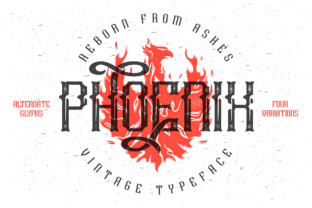
Phoenix Vintage Typeface: A Detailed Look at Its Four Variations and Practical Use
Typography can make or break a design project. Among the many options available, Phoenix stands out as a distinctive vintage typeface that brings both character and flexibility to the table. Designed with a thoughtful system of four variations per character, Phoenix offers designers a level of nuance rarely found in a single font family. Whether you are building a brand identity, designing packaging, or creating editorial layouts, understanding what Phoenix offers and how to use it effectively can elevate your work considerably.
What Makes Phoenix Different from Standard Vintage Fonts
Most vintage typefaces rely on a single glyph set with perhaps a handful of alternates. Phoenix takes a more structured approach. For each character, you get four distinct variations. This is not just a collection of random alternates thrown together for visual flair. Each variation serves a specific purpose within a design system. The first is a basic, clean glyph intended for small text sizes where readability matters most. The second acts as the main font version, designed for body copy and standard headings. Then come the two variations with swashes: one features upper swashes, the other lower swashes. This system gives you predictable control over how ornate or restrained your text appears.
An original clean version of Phoenix also exists without any rough or distressed effects. This is worth emphasizing because many vintage fonts come pre-weathered, which limits their use in certain contexts. With Phoenix, you can choose the clean variant for applications that require a polished vintage look, or you can pair it with other distressed elements later in your workflow. It offers flexibility rather than prescribing a mood from the start.
The Four Variations Explained in Practice
Let us take a closer look at how each variation works and where it fits best.
Variation one: the clean basic glyph. This version is simplified, with minimal ornamentation. It is designed for situations where type needs to remain legible at smaller sizes, such as captions, footnotes, or metadata. Because it strips away the swashes and decorative flourishes, it ensures that the text does not become cluttered when space is tight. If you are setting a long passage of small text in Phoenix, this variation prevents eye fatigue while preserving the overall vintage character.
Variation two: the main font. This is the workhorse of the family. It retains the vintage DNA of Phoenix but balances ornamentation with readability. Use this for body paragraphs in editorial design, product descriptions, or mid-sized headings. It has enough personality to communicate a retro feel without overwhelming the reader. In practice, this variation works well for anything from menu copy to blog post body text when you want a consistent historical aesthetic.
Variation three: lower swashes. Here the decorative elements extend downward from the characters. This creates a sense of movement and visual weight at the baseline. Lower swashes work particularly well for headlines, pull quotes, or display text where you want the typography to feel grounded and substantial. They can also be used effectively in logo treatments or wordmarks where the lower portion of the text needs to anchor the composition.
Variation four: upper swashes. These extend upward, giving the text a lifted, graceful appearance. Upper swashes are ideal for titles, subheadings, or short phrases where you want an airy, elegant feel. They work well on packaging, book covers, and posters where the typography needs to draw the eye upward and create a sense of aspiration or delicacy.
Having all four variations within a single typeface means you can mix them thoughtfully within the same project. For example, a book cover might use upper swashes for the title, lower swashes for the author name, the main font for a subtitle, and the clean basic glyph for a small tagline at the bottom. This kind of layered typography creates hierarchy and interest without requiring multiple font families.
Practical Benefits for Modern Workflows
Phoenix integrates well into contemporary design workflows because it reduces the need for manual glyph swapping. Instead of hunting through a character map for alternates, you have a predictable system. Most design software supports OpenType features, so you can access the four variations through stylistic sets or character alternates panels. This saves time and ensures consistency across a project.
Another practical benefit is file size and project organization. With Phoenix, you are working with a single typeface that covers multiple stylistic needs. This means fewer font files to manage, fewer licensing considerations, and simpler handoff to developers or printers. For web designers, this translates to faster page loads and fewer HTTP requests. For print designers, it means fewer font embedding issues during preflight checks.
The clean version of Phoenix also simplifies the process of combining the typeface with other visual elements. Because it does not come with baked-in rough edges or distress, you can apply your own effects, textures, or overlays without fighting the font's original design. This is especially useful for branding projects where consistency across digital and print materials matters. You can use the clean version for a website's body text, add a subtle texture for printed business cards, and apply a heavier distressed effect for a poster series, all while using the same font family.
Scenarios Where Phoenix Excels
Phoenix is not a one-size-fits-all solution, but it shines in several specific contexts. For small businesses and boutique brands that want a handcrafted, artisanal feel, Phoenix offers enough variation to create a distinctive visual identity without appearing generic. A coffee roaster, for instance, might use the upper swash variations for bag labels and the clean basic glyph for ingredient lists. A bakery could use the main font for menu boards and the lower swash version for decorative signage.
Editorial designers working on magazines, zines, or newsletters with a retro theme will find Phoenix useful for creating consistent yet varied typographic hierarchies. The four variations allow you to differentiate sections, subheads, quotes, and captions without leaving the same font family. This keeps the overall design cohesive while still providing visual contrast.
Packaging design is another strong use case. Many products in the food, beverage, and lifestyle sectors aim for a nostalgic or heritage look. Phoenix gives designers the tools to create that feel authentically. The swash variations work well on the front of a package to attract attention, while the clean versions can handle the fine print on the back without compromising legibility.
Event materials such as invitations, programs, and posters also benefit from Phoenix's range. A wedding invitation might use upper swashes for the couple's names, lower swashes for the date, and the main font for the ceremony details. The clean version can handle the RSVP card or small print directions. This creates a unified look across all printed pieces.
Considerations Before Choosing Phoenix
Like any specialized typeface, Phoenix comes with factors worth considering before committing to it for a project. The swash variations, while beautiful, require careful spacing and kerning adjustments. Swashes can sometimes cause awkward collisions between adjacent characters, especially in tightly set headlines. You may need to manually adjust tracking or use OpenType ligature features to avoid overlapping. This is not a flaw in the font itself but rather a practical reality of working with ornate typography.
Another consideration is readability at very small sizes. While the clean basic glyph is designed for small text, the swash versions lose legibility quickly below a certain point size. For body copy under 10 points, stick with the clean or main font versions. Reserve the swash variations for larger display settings where their detail can be appreciated.
Licensing is also worth checking. Some typefaces with multiple stylistic sets have different licensing terms for each variation. Ensure that your intended use, whether commercial, personal, or web-based, is covered under the license you purchase. Phoenix is generally well-regarded for offering fair licensing, but it never hurts to verify before downloading or buying.
Finally, consider the overall aesthetic direction of your project. Phoenix has a distinct vintage personality. It works beautifully for projects that align with that mood, but it may clash with ultra-modern or minimalist design systems. If your project leans toward a sleek, contemporary look, Phoenix might feel out of place unless used sparingly as a contrast element.
Final Observations on Working with Phoenix
Phoenix is a well-crafted typeface that rewards designers who take the time to understand its variation system. It is not just a collection of pretty letters; it is a practical tool for building typographic hierarchy and visual interest within a single font family. By offering four predictable variations per character, including a clean version without rough effects, Phoenix addresses a genuine need in vintage typography: the need for both flexibility and consistency.
For designers who frequently work on retro-inspired projects, Phoenix can become a reliable go-to. It reduces the complexity of managing multiple fonts while still providing the stylistic range that vintage design demands. Whether you are setting a short headline or a long article, working in print or on screen, Phoenix gives you the control to say what you need to say with the right amount of flourish.
The best way to understand what Phoenix can do is to test it in a real project. Start with a simple layout and experiment with assigning different variations to different text elements. Notice how the character of the page changes when you swap a headline from the main font to an upper swash version. Pay attention to how the clean basic glyph stabilizes small text while the swash versions add drama at larger sizes. With practice, you will develop an instinct for which variation to use where, and Phoenix will become a natural part of your design vocabulary.