Flying Landing: Why This Futuristic Squared Display Font Demands a Thoughtful Approach
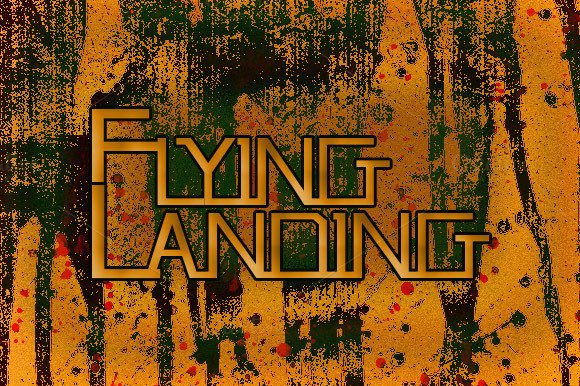
You have likely seen Flying Landing before you knew its name. That bold, squared, futuristic lettering appears everywhere from tech startup landing pages to game covers and poster designs. Its high-impact style grabs attention immediately. But here is the catch: the same qualities that make Flying Landing stunning also make it easy to misuse. Many designers, marketers, and business owners rush to adopt this font without understanding what it actually does to readability, brand perception, and usability. Let us walk through the most common pitfalls and how to avoid them.
Mistaking a Display Font for a Workhorse Font
The most frequent mistake is treating Flying Landing as if it were a versatile text font suitable for paragraphs, body copy, or long-form content. It is not. Flying Landing is a display font, designed for headlines, titles, short bursts of text, and visual anchor points. Its squared, geometric shapes and futuristic personality work brilliantly at larger sizes, but shrink it down for a paragraph and you lose legibility fast.
Imagine placing a paragraph of Flying Landing at 12 points in a mobile app interface. The tight counters, squared terminals, and uniform stroke widths begin to blur together. Readers will squint, skip content, or simply bounce. The effect is not just poor readability — it undermines trust. If someone cannot comfortably read your message, they assume the rest of your work is equally careless.
A better approach: Reserve Flying Landing for headlines, subheadings, hero text, call-to-action buttons, or short labels. Pair it with a clean, neutral companion font for body content — something with open counters, generous x-height, and classic readability. Sans-serif fonts like Open Sans, Inter, or even a simple system font work well because they contrast Flying Landing’s squared geometry without clashing.
Ignoring Kerning and Letter Spacing Nuances
Flying Landing has a squared, uniform structure that can create optical crowding in certain letter combinations. Letters like “A” next to “V” or “L” next to “T” may appear too close or too far apart depending on the specific glyph design. Many users install the font, type a headline, and assume the default spacing is correct. It rarely is.
This oversight can make your carefully designed headline look amateurish. Squared fonts amplify spacing inconsistencies because the geometry is so rigid — there is no organic curvature to soften gaps. When you pair that with tight tracking, the result is a dense block that reads as “shouting” rather than “impact.”
What actually helps: Always manually adjust kerning and tracking when using Flying Landing at display sizes. Increase letter spacing slightly — around 20 to 50 units depending on your software — to give each character room to breathe. For all-caps headlines, which are common with this font, add even more space between letters. Test your word at actual output size before finalizing. A quick two-second zoom in Figma, Illustrator, or your design tool will reveal spacing issues that look fine at thumbnail size.
Overlooking Context and Brand Fit
Flying Landing is not subtle. It communicates future, innovation, speed, and digital-native energy. That works beautifully for tech products, gaming brands, event promotions, and creative agencies. But using it for a law firm website, a medical practice logo, or a nonprofit annual report sends a confusing signal. The font’s personality overpowers the message.
I have seen small business owners choose Flying Landing simply because it looked cool on a font marketplace preview, without considering whether it matched their industry or audience expectations. The result was a brand that felt disconnected and hard to take seriously in the right context.
How to evaluate fit: Before committing, ask yourself three questions. First, does your brand need to feel futuristic, bold, or high-energy? Second, will your audience encounter this font in a setting where that tone feels appropriate? Third, can the font scale across your full brand system without feeling forced? If the answer to any of these is uncertain, test Flying Landing on a single piece of collateral first — a landing page hero, an event poster, or a social media template. Let the real-world reaction guide your decision.
Downloading Without Checking Licensing
This is where many otherwise careful creators get tripped up. Flying Landing is available through several font marketplaces, and the licensing terms vary significantly. A personal-use license will not cover a commercial website, an app interface, a product logo, or printed merchandise. Using the font in those contexts without the right license is both a legal risk and a professional one.
I have watched freelancers deliver a client project that looked fantastic, only to discover later that the font license did not cover web embedding or logo usage. The cost of retroactively purchasing a commercial license — or worse, redoing all the typography with a different font — eats into your time and budget quickly.
What to check before you buy: Look at the license details for desktop use, web use, app embedding, and logo use separately. Some marketplaces offer tiered licenses. If you plan to use Flying Landing in a brand logo, confirm that the license allows for trademark or logo usage without royalty fees per impression. For web use, ensure the license covers @font-face embedding. Keep a copy of your license receipt in your project folder. It seems obvious, but it is the kind of detail that saves you when a client asks for proof.
Assuming All Weights and Styles Behave the Same
Flying Landing may come in multiple weights — light, regular, bold, and possibly condensed or expanded versions. Each weight behaves differently at different sizes. The bold weight, while visually commanding, can close up interior spaces and become nearly unreadable at medium sizes. The light weight, on the other hand, may feel too thin when printed on uncoated paper or displayed on a low-resolution screen.
Many users download one weight, use it everywhere, and wonder why the font looks inconsistent across applications. The reality is that each weight has an ideal size range and use case. You cannot simply scale a bold headline weight down for a small subhead and expect it to maintain its integrity.
A more reliable process: Test each weight at the actual size and medium you intend to use. Print a sample. View it on a phone screen. Check it on a projector. Adjust weight choice based on those results. If you need both a headline and a small subhead in Flying Landing, consider using a lighter weight for the smaller text and the bold weight for the primary headline. That preserves contrast while keeping readability intact.
Neglecting Hierarchy and Contrast
Flying Landing is so visually strong that it can flatten your typographic hierarchy if you are not careful. When every headline, subhead, and label uses the same font with the same weight and color, the viewer sees a wall of equally loud text. Nothing guides the eye to what matters most.
I see this frequently in event posters and promotional landing pages where the designer wanted to maximize the font’s impact but ended up creating a chaotic, fatiguing reading experience. The audience does not know where to look first, so they look away.
How to structure hierarchy: Use size, weight, color, and spacing to create clear visual order. Your primary headline should be the largest and boldest Flying Landing treatment. Subheadings can use a lighter weight or smaller size. Keep supporting labels minimal. Introduce a secondary font for body content or secondary information. This contrast allows Flying Landing to do what it does best — anchor your design with authority — while the rest of the content supports that anchor without competing.
Relying Only on the Preview
Font marketplace previews and foundry samples show Flying Landing in ideal conditions: perfectly kerned, set at large sizes, often with minimal surrounding content. Real-world usage is rarely that clean. Background images, color overlays, responsive layouts, and printing methods all affect how the font appears.
I have watched designers fall in love with a preview, purchase the font, and then struggle to make it work on a dark background with a gradient behind it. The squared edges that looked crisp on white now feel muddy. The contrast drops. The impact disappears.
The practical fix: Always test Flying Landing in your actual design environment before finalizing. Drop it into your layout with your actual background, colors, and content. View it at different breakpoints. Print a sample on your target paper stock if it is for print. Ask a colleague to read it from across the room. These tests reveal what the preview never will.
Final Perspective on Flying Landing
Flying Landing is a remarkable display font when used with intention. Its squared, futuristic forms bring energy and uniqueness to any project that needs to stand out. But that power comes with responsibility. By avoiding the common mistakes around usage, spacing, licensing, weight selection, and hierarchy, you ensure the font elevates your work rather than undermines it. Take the time to pair it thoughtfully, test it honestly, and license it properly. Your design will thank you, and your audience will read the message you intended — not just a font that got in the way.