Elpida Vintage: Why This Bold Display Font Deserves a Place in Your Toolkit
You have seen the trend everywhere—vintage-inspired branding, retro posters, packaging that looks like it stepped out of a mid-century magazine. And chances are, you have tried to recreate that look yourself, only to end up with something that felt forced, flat, or just not quite right. The font you choose can make or break that authentic vintage feel. That is where Elpida Vintage enters the conversation. This is not just another decorative typeface. It is a bold, expressive display font built to give your designs real character. But like any powerful tool, it works best when you understand what it is meant for, what it struggles with, and how to avoid the common pitfalls that trip up even experienced designers.
What Elpida Vintage Actually Is (And Is Not)
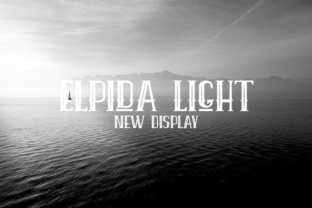
Let us start with a clear picture. Elpida Vintage is a display font designed for impact. It draws heavily on mid-century and early modern typography, with thick strokes, pronounced serifs, and a confident, almost theatrical presence. This is not a font you use for body text or long paragraphs. It is a headline font, a poster font, a logo font. Its purpose is to grab attention and set a mood—warm, nostalgic, and unapologetically bold.
People are drawn to it for good reason. When applied correctly, it brings an instant layer of authenticity to projects that need a retro soul. But the misunderstanding often starts right here. Many beginners see a vintage font and assume it will automatically make their design look timeless. In reality, Elpida Vintage demands thoughtful pairing, careful spacing, and an understanding of the era it references. Without that, the result can feel costume-like rather than credible.
Common Mistake: Treating It Like a Multipurpose Font
The most frequent error I see is using Elpida Vintage for everything in a single project—headline, subhead, body text, captions. This is a recipe for visual fatigue. The font is designed to be seen in short, powerful bursts. When you stretch it across long sentences or small sizes, it loses its charm and becomes hard to read. Your audience will not stop to admire the retro vibe; they will squint and move on.
Better approach: Reserve Elpida Vintage for the most important element on the page. A main headline, a brand name, a single strong callout. Pair it with a clean, neutral sans-serif for supporting text. That contrast lets the vintage font breathe and do its job without overwhelming the viewer.
Another Misstep: Ignoring Letter Spacing and Kerning
Because Elpida Vintage has such bold, wide letterforms, default spacing can sometimes look uneven or cluttered. Many people install the font, type their headline, and call it done. But display fonts—especially vintage ones—often need manual adjustment. The letters in Elpida have distinct shapes that can create awkward gaps or collisions if you do not fine-tune the kerning.
What to do instead: After typing your headline, go through each letter pair and adjust spacing manually. Pay special attention to combinations like A and V or T and O, where the shapes might feel too close or too far apart. A little extra tracking (letter spacing) can also give the font more breathing room and enhance its retro feel. This step alone can elevate your design from amateur to intentional.
Overlooked Details That Affect Quality and Usability
Even experienced creatives sometimes miss a few key points when working with a font like Elpida Vintage. These details can affect everything from print quality to digital readability, and they are worth checking before you commit to a final design.
File Format and Source Legitimacy
Not all downloads are created equal. If you obtain Elpida Vintage from an unofficial source, you risk getting a corrupted file, missing glyphs, or a version that does not include important characters like accents, ligatures, or alternate glyphs. This can be a serious problem if you are designing for a multilingual audience or if you need specific typographic features.
Practical advice: Always download from a reputable foundry or marketplace. Check the product description to see what formats are included (OTF, TTF, WOFF) and whether the font supports the character set you need. If you are a web designer, make sure the webfont version is properly licensed and optimized for performance. A legitimate purchase saves you hours of troubleshooting later.
Ignoring Context and Audience
Elpida Vintage carries strong visual cues from a specific time period. That is its strength, but it can also be a limitation. If you are designing for a brand that wants to feel modern, minimalist, or futuristic, this font will likely clash. I have seen entrepreneurs fall in love with the aesthetic and force it into a brand identity where it simply does not belong. The result is confusing to customers and dilutes the brand message.
A better way: Before using Elpida Vintage, ask yourself what era or emotion the font evokes and whether that aligns with the project goals. For a coffee shop with a 1950s diner theme? Perfect. For a tech startup targeting Gen Z? Probably not. Matching the font to the audience and context is what creates that effortless, authentic look rather than a forced one.
How These Mistakes Affect Your Results
Each of these missteps has real consequences. When you overuse the font, you sacrifice readability and professionalism. When you ignore spacing, your design looks unfinished. When you choose the wrong source, you waste time and money on a file that may not work. And when you misuse the font for the wrong audience, you miss the opportunity to connect with viewers on a deeper level.
The good news is that all of these problems are avoidable with a little awareness and planning. Typography is a skill, and like any skill, it improves with attention to detail. Elpida Vintage can be a standout asset in your design library when you treat it with the respect it deserves.
Practical Guidelines for Using Elpida Vintage Effectively
Let me give you a straightforward checklist to keep your projects on track. You do not need to be a professional typographer to apply these principles, but they will save you from the most common frustrations.
- Use it sparingly. One or two words per design element. Let the font be the hero.
- Pair it with a neutral counterpart. A clean sans-serif like Helvetica, Open Sans, or Montserrat works well. The contrast will make both fonts look better.
- Adjust spacing every time. Default kerning is a starting point, not a finish line. Manual tweaking is expected with display fonts.
- Test at different sizes. Elpida Vintage shines at large sizes but may lose impact or readability below 24 points. Know its limits.
- Check for licensing. If you are using the font for commercial projects, verify that your license covers that use. Some fonts restrict usage in logos, merchandise, or digital ads.
- Consider color and background. Vintage fonts often pair beautifully with warm, muted tones, off-white backgrounds, or textured paper effects. A stark white screen with pure black text can make even the best font feel cold.
Realistic Example: Before and After
Imagine you are designing a poster for a local record store event. You open a blank document, type “Vinyl Night” in Elpida Vintage, and leave the spacing as is. You add a subhead in the same font at a smaller size, then use it again for the date and time. The result looks crowded and the subhead is hard to read.
The improved version: Keep “Vinyl Night” in Elpida Vintage with generous letter spacing. Use a simple sans-serif for the date, time, and location. Add a subtle warm texture to the background. Reduce the font size for the supporting info so the headline remains dominant. Now the poster feels cohesive, inviting, and genuinely retro without being overwhelming.
What to Check Before You Buy or Download
Before you add Elpida Vintage to your collection, take a few minutes to evaluate whether it is the right fit for your current and future projects. Here is what I recommend looking into:
- Glyph coverage: Does it include numbers, punctuation, and special characters you need? Some display fonts have limited character sets.
- Alternate characters and ligatures: Many vintage fonts include stylistic alternates that give you more creative flexibility. Check if Elpida offers these.
- Web vs. print license: If you design for both, make sure your license covers both use cases. Some foundries require separate licenses.
- Language support: If your audience reads in languages with accented characters, verify that the font supports them.
- Reviews and examples: Look at how other designers have used the font in real projects. This gives you a realistic sense of its strengths and limitations.
Taking these steps before purchasing will prevent disappointment and save you from having to hunt for a replacement mid-project.
Final Thoughts on Making Elpida Vintage Work for You
Elpida Vintage is a beautiful, expressive tool that can bring a lot of personality to your work. It has the potential to give your projects tons of authenticity when you use it with intention. But like any specialized font, it asks you to think about context, pairing, spacing, and audience. That is not a flaw—it is a sign that the typeface has a strong identity of its own.
If you approach it with respect for what it does best, you will avoid the common mistakes that lead to clunky, unpolished designs. And if you ever feel unsure, remember that typography is about communication first. Ask yourself: Does this font help my message land? Does it make the viewer feel something? When the answer is yes, you know you have used it well.
Whether you are designing a logo, a poster, a social media graphic, or a product label, Elpida Vintage can be the bold, authentic choice that sets your work apart. Take your time, test your options, and trust your eye.