Halloween: Integrating Scary Design Fonts into Your Creative Workflow
Halloween has evolved from a single night of costumes and candy into a major seasonal event that drives marketing campaigns, product launches, and creative projects for weeks. For designers, marketers, and small business owners, the holiday offers a unique opportunity to tap into a visual language of playful fear, nostalgia, and dark humor. But executing a cohesive Halloween-themed design requires more than just picking a spooky image. Typography often sets the tone before any visual element is even noticed. The right font can make a poster feel haunted, a social post feel urgent, or a landing page feel festive. This is where a dedicated Halloween font pack becomes a practical asset—not just a decorative extra, but a tool that fits into a structured creative workflow.
Understanding Where Halloween Fits in Your Process
Halloween, as a theme, rarely stands alone. It interacts with multiple phases of a project: planning, ideation, production, and distribution. Before you even open your design software, you need to decide whether your use of Halloween typography is for a direct event (invitations, banners) or for a seasonal brand refresh (social media graphics, limited-edition packaging). The font pack you choose should support both the creative direction and the technical requirements of your deliverables. For instance, if you are designing a multi-page PDF for a Halloween event program, you need a font that works well in body text sizes, not just in display headlines. If you are building an email campaign, the font must render properly across email clients—or you may use it in images instead of live text.
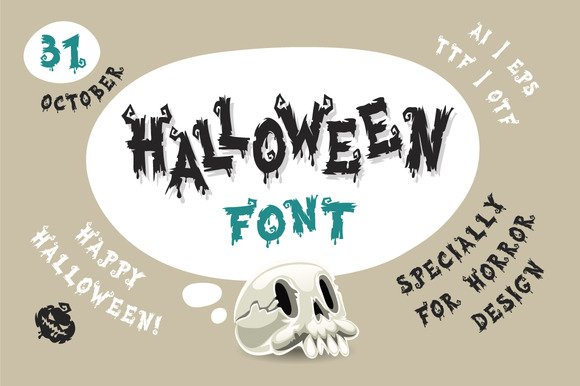
The pack described here includes fully editable vector AI, EPS, JPG, transparent PNG, and fonts in OTF and TTF formats. That range of file types immediately tells you it is built for integration across different stages of a project. You can use the vector files in Adobe Illustrator or Affinity Designer to create custom layouts, then export the transparent PNGs for quick social media posts. The OTF and TTF fonts allow you to install the typeface and use it directly in your word processor, presentation software, or web design tool. This reduces friction when moving between concept and final output.
Practical Use Cases Before, During, and After a Project
Halloween fonts are not limited to the day itself. You can use them weeks in advance to build anticipation. For a retail business, consider using the font in email subject lines (rendered as an image) or in countdown-style graphics for your Instagram stories. During the project, the font becomes a consistent visual anchor across all materials: posters, flyers, website headers, and product labels. After Halloween ends, you may repurpose some of the assets for a post-holiday sale or a "spooky season" content series. Because the font pack includes vector files, you can easily open the AI or EPS files the following year, swap out text, and update colors without starting from scratch. This long-term reusability is a practical consideration for anyone who manages seasonal content year after year.
Planning Your Halloween Design Project
Before you download any font, take a few minutes to define your deliverables. List every piece of content that will carry Halloween theming: email headers, social media templates, website hero images, physical signage, and maybe even merchandise like T-shirts or mugs. Then decide which items need a bold display font and which need a more readable version. Some font packs offer multiple weights or styles; others are purely decorative. The pack mentioned here is described as “perfect for scary designs,” which suggests it leans toward dramatic, high-impact lettering. Use it for headlines and call-to-action buttons, but pair it with a clean sans-serif or slab-serif for body copy to maintain readability. For example, you might use the Halloween font for the main title on a flyer, but use a simple web-safe font for the event details and contact information. This contrast also emphasizes the spooky theme without overwhelming the viewer.
Compatibility and Software Integration
One of the biggest workflow roadblocks is font compatibility. OTF and TTF are universally supported across Windows, macOS, and most design software. You can install the font on your system and use it in Word, PowerPoint, Canva (if uploaded), or professional tools like Photoshop and Illustrator. The vector AI and EPS files are particularly valuable if you need to modify individual letter shapes or combine them with vector illustrations. For instance, you might open an AI file to adjust the spacing between letters for a specific layout, or to create a custom wordmark for your brand. The transparent PNG files serve as ready-to-use images for clients who cannot or do not want to install fonts. You can drop them directly into a web builder like Squarespace or Wix without any extra formatting. This saves time when working with non-designers or when deadlines are tight.
Building a Consistent Visual Identity Across Channels
Consistency is essential for any seasonal campaign. Your Halloween font should appear in enough places to create a cohesive look, but not so much that it becomes repetitive. A good rule is to use the font for primary headings and key messages, then rely on secondary assets—like icons, patterns, or background graphics—to reinforce the theme. The vector files in this pack likely include pre-made letters or a full alphabet as vector objects, which you can color-match to your brand palette. If your brand colors are orange and black, you can easily apply those to the font in AI or EPS. If you need a lighter Halloween vibe, try a dark purple on light gray instead. The ability to edit vector files ensures that the font conforms to your existing style guide rather than forcing you to adjust your brand to the font.
For teams, the font pack simplifies collaboration. You can share the OTF or TTF files with other designers so everyone uses the exact same typeface. You can also provide the transparent PNGs to email marketers or social media managers who may not have design software. This reduces the risk of someone using a different font or stretching the type incorrectly. When all team members have access to the same resources, the final output looks unified even if multiple people worked on different parts.
Quality Control and Testing Before Launch
Before you finalize any Halloween design, test the font in the actual medium where it will appear. A font that looks sharp on a 27-inch monitor may become muddy or illegible on a smartphone screen. If you are using the font in a website or app, check how it renders with system fallback fonts—some Halloween typefaces have thin strokes that disappear at small sizes. In that case, use the font only for large headlines and rely on a simpler fallback for smaller text. For printed materials, request a proof or print a test page to ensure the font does not bleed or lose detail. The vector formats give you the highest quality for print, especially if you are ordering large banners or signage. The JPG and PNG versions are acceptable for web and social media, but always keep the original vector file for any future edits or scaling.
Organizing Your Font Assets for Long-Term Use
Once you download the pack, create a dedicated folder on your cloud storage or local drive labeled “Seasonal Assets – Halloween 2025” or similar. Inside, subfolders for each file type: AI, EPS, JPG, PNG, OTF, TTF. This makes retrieval easy next October. Also rename the font files with a descriptive name that includes the style (e.g., “HalloweenScaryFont-Bold.otf”) if the original names are cryptic. If you work with multiple clients or brands, store the font files with project names or brand codes. That way you avoid accidentally using a Halloween font for a non-Halloween project. Over time, you will build a library of seasonal resources that you can pull from without a fresh search each year. That alone can save hours of browsing and downloading.
Practical Workflow Example: A Small Business Campaign
Imagine you own a local coffee shop and want to run a Halloween special. Your deliverables: a window poster, a social media post, an email to your mailing list, and a small banner for your website. Start by opening the AI file in Illustrator and use the font vector to create a headline “Brewed to Be Frightful.” Adjust the letter spacing and color to match your shop’s brown and orange palette. Export a high-resolution JPG for the poster and a transparent PNG for the web. For the email, create an image version of the headline using the PNG, then place it in your email builder. Use the OTF font to type the offer details directly in your email tool (if supported) or use a standard fallback. For social media, use the PNG over a dark purple background with a subtle gradient. Because you have the vector file, you can easily resize the headline for Instagram stories versus Facebook feed without losing quality. The entire workflow, from concept to final assets, can be completed in under two hours if your files are organized.
Adapting Halloween Typography for Different Audiences
Not every Halloween design needs to be gory or ultra-scary. The same font pack can be used for family-friendly events, corporate Halloween parties, or classroom materials. The key is context and color—use bright oranges, soft greens, and playful compositions to dial down the horror. The vector files allow you to soften the font by adding outlines, shadows, or fills that change its mood. For a children’s party invitation, you might fill the letters with a candy corn gradient and add a subtle glow. For a professional firm’s Halloween networking event, keep the font clean and use dark navy with metallic gold accents. The font itself is the consistent element; your design choices around it determine the tone.
Collaborating with Clients or Non-Designers
If you provide design services to clients who want Halloween-themed materials, the transparent PNG files become invaluable. Clients often need to make last-minute changes to text or dates. Instead of asking them to install a font, you can deliver a series of pre-made PNG files with blank spaces or editable text fields. Alternatively, you can provide the font file along with instructions for installation, but many clients are not comfortable with that. The vector AI and EPS files also let you create template files where the client can only edit specific text layers in Adobe Reader or a free vector viewer. This maintains design integrity while giving them control over basic content. Such flexibility builds trust and reduces revision cycles.
Final Thoughts on Integrating Halloween Fonts into Your Routine
Halloween is a recurring event that rewards preparation. By investing in a high-quality font pack that includes multiple formats, you are not just buying a set of letters—you are acquiring a time-saving resource that supports your entire design workflow from planning to distribution. The OTF and TTF files ensure system compatibility across your devices. The vector AI and EPS files give you editing power for custom layouts. The transparent PNG files offer instant use for quick turnarounds. When you organize these assets and pair them with clear project planning, you create a repeatable process that can be adapted every year. Whether you are a solopreneur handling your own marketing or a creative agency managing multiple seasonal campaigns, this font pack becomes a reliable component of your toolkit. And when the holiday arrives, you will have already spent your creative energy on making the designs memorable—not on wrestling with file formats.