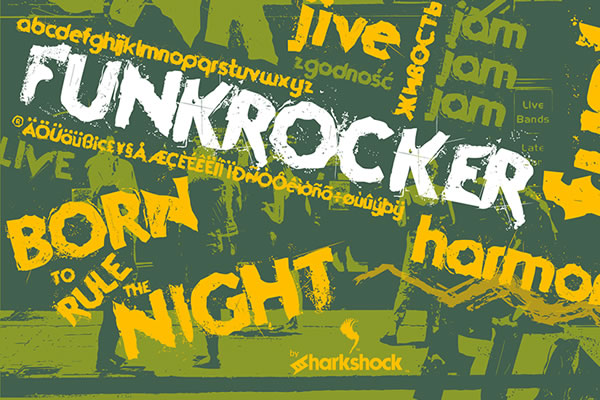
Funkrocker: A Grunge-Inspired Typeface That Works With Your Workflow, Not Against It
Every designer, publisher, or content creator eventually hits a wall where the usual sans-serif or clean serif fonts feel too sterile for a project. You need something with texture, with tension. You need a typeface that communicates rawness without sacrificing legibility. That is where Funkrocker enters the process—a grunge-inspired urban display font that sits at the intersection of expressive design and practical application. It is rough around the edges, but not at the expense of readability. And that balance is harder to find than most people realize.
Whether you are laying out album art, crafting a poster for a local event, or building a title sequence for a short film, the decision of which typeface to use affects everything downstream. Choosing Funkrocker early in your workflow can streamline your visual direction, reduce the need for additional texture effects, and give your project a cohesive, lived-in feel from the start.
What Funkrocker Actually Brings to Your Process
Before we talk about implementation, let's get specific about what this typeface contains. Funkrocker is not a one-trick novelty font. It includes basic Latin, supplemental Latin, punctuation, European accents, and Cyrillic characters for Russian and Ukrainian. That means if you work across multiple languages or with clients in Eastern Europe, you do not need to switch typefaces mid-project. The character set covers real use cases, not just English headlines.
The glyphs are deliberately rough-edged—think distressed ink, uneven strokes, and a hand-drawn feel—but they read clearly at display sizes. This is not a font you would use for body copy, but for titles, headers, and short-form emphasis, it performs exactly as intended. Additionally, alternate uppercase letters are available in any editing program that supports OpenType features (OTF). This is a critical detail for workflow efficiency: you can access alternates directly without opening a separate glyph panel or switching to a different font file. That saves time and keeps you in your creative flow.
Where It Fits Before a Project: Planning and Visual Direction
When you are in the early stages of project planning—moodboarding, sketching, or defining visual tone—Funkrocker serves as a quick reference point. If your concept calls for something urban, youthful, or slightly rebellious, loading this typeface into your font manager or design software immediately gives you a visual anchor. You can test it against color palettes, photographic backgrounds, or vector elements to see whether the grunge aesthetic aligns with your client brief or personal vision.
This is especially useful for professionals like marketers and small business owners who might not have a dedicated art director. Instead of spending hours applying post-production effects to make a clean font look distressed, you start with a font that already has that texture baked in. That means fewer iterations, faster feedback loops, and a clearer path to approval.
During the Project: Integration with Design Tools and Assets
Funkrocker integrates smoothly into standard design workflows because it is an OTF font. Whether you use Adobe Creative Cloud, Affinity Suite, Figma, Canva (via upload), or even word processing software like Microsoft Word or Google Docs, the typeface installs and behaves predictably. For users working in Illustrator or InDesign, the OpenType alternates are accessible through the Character panel or Glyphs panel. This allows you to customize the look of repeated characters—especially helpful if your title contains multiple uppercase letters that would otherwise look identical.
From a consistency standpoint, using a single typeface with built-in alternates is better than mixing several grunge fonts from different sources. Mixing fonts often introduces inconsistent line weights, x-heights, or mood shifts that undermine the visual cohesion of your layout. With Funkrocker, you can vary the appearance of your text while maintaining a unified family feel.
Practical Tips for Working with Alternates
- Test early. Before you commit to a layout, cycle through the alternate uppercase letters to see which combinations feel balanced. Some alternates are more distressed than others; choose based on how much texture your composition needs.
- Use alternates for emphasis. In a multi-word title, apply a standard uppercase to smaller words and an alternate to the key word. This adds hierarchy without extra styling.
- Pair with neutral backgrounds. Funkrocker performs best on solid or subtly textured backgrounds. Busy photographic backgrounds can compete with the glyphs; consider a semi-transparent overlay to maintain contrast.
- Check Cyrillic glyphs early. If your project includes Russian or Ukrainian text, verify that the characters render correctly in your software before you build the entire layout. OTF support varies slightly across applications.
Real Workflow Examples Across Use Cases
Let's walk through three distinct scenarios where Funkrocker fits naturally into a broader process. These are not hypotheticals—they reflect the kind of work that freelancers, publishers, and creators handle regularly.
Album Art for an Independent Musician
Imagine you are designing a cover for a lo-fi rock EP. The client wants something that feels raw and unpolished, but still professional. You pull up Funkrocker, set the artist name in a large alternate uppercase, and place the EP title in a smaller standard lowercase. The rough edges of the typeface mirror the recording quality of the music. You do not need to add grain overlays or rough brushes to the text—the font carries that weight. From a workflow perspective, this saves you at least two steps in post-production. You can spend that time refining the composition or the color grade instead.
Event Poster for a Local Venue
Poster design is often a fast-turnaround task. You have one or two days to produce something that prints well and reads from a distance. Funkrocker's legibility at larger sizes makes it a strong candidate for event headers. Pair it with a clean sans-serif for the supporting details (date, time, location) to create contrast. The grunge treatment communicates urgency and authenticity—qualities that matter for underground shows, art openings, or community events. Because the font includes European accents, you can also handle multilingual event names without switching typefaces.
YouTube Channel Titles and Thumbnails
Digital content creators sometimes overlook typography in thumbnails, but it directly affects click-through rates. Funkrocker works well for episode titles or channel names in YouTube thumbnails, especially if your content focuses on music, gaming, streetwear, or commentary. The distressed look reads as bold and unpolished, which can cut through the overly polished aesthetic of mainstream content. For workflow efficiency, you can create a template in your editing software with pre-set Funkrocker styles and alternates, then swap out text each week without rebuilding the design.
Factors to Consider Before Implementing Funkrocker
No typeface is a universal solution, and Funkrocker has specific strengths that you should align with your project's demands. Here are practical considerations to help you decide when and how to use it.
Preparation: Font Licensing and File Management
Before you integrate Funkrocker into a collaborative workflow, confirm the licensing terms. If you are working in a team environment, ensure that all members install the correct OTF version. Mismatched font versions can cause missing glyphs or altered kerning, especially when files move between Windows and macOS. Add the typeface to your shared font library (if you use one) or include it in the project assets folder with a clear note about its alternates feature.
Compatibility Across Platforms
Funkrocker's OTF format is widely supported, but not all software handles OpenType alternates the same way. In Canva, for example, you may need to access alternates through the text panel rather than directly. In Figma, you can use the OTF features via the font settings. Always test a sample string in your target application before you build out the full design. This is especially important if you are producing files for a client who will edit them later in a different program.
Long-Term Use and Consistency
If you plan to use Funkrocker across multiple projects—say, for a brand identity or a recurring content series—document which alternates you use for key logos or titles. This ensures that the brand's typographic voice remains consistent over time. Without documentation, a different designer (or your future self) might select different alternates and inadvertently create visual drift. Save a simple PDF or style guide page that shows the chosen letterforms for the logo or main header.
Usability and Quality Control in Daily Work
For professionals who manage multiple projects simultaneously—freelancers, publishers, educators—usability is about more than aesthetics. It is about how the font behaves under repeated use. Funkrocker installs like any standard OTF font and does not require additional software or plug-ins. This matters when you are working on a deadline and cannot afford to troubleshoot a proprietary font system. The glyph set covers the essentials, so you are unlikely to encounter missing characters mid-project.
Quality control in typography often comes down to spacing and kerning. Grunge fonts sometimes have inconsistent letter spacing because the distress marks shift the visual weight. Funkrocker's glyphs are designed to balance rawness with readability, but you should still manually adjust kerning for critical pairs—especially in large display text. Print a physical proof if possible, because screen rendering can mask subtle spacing issues that become obvious on paper.
Using Funkrocker in Collaborative Workflows
When you work with other designers, copywriters, or clients, communication about typeface choices matters. Send a quick reference showing Funkrocker in context—on a mockup, not just a character map. This reduces the chance of someone rejecting the font because it looks too rough in isolation. Also, because the typeface includes Cyrillic support, it can serve as a unifying typographic choice in multilingual projects, reducing the need to manage separate Latin and Cyrillic fonts.
Observations from Practical Use
After working with Funkrocker across several projects, a few patterns emerge. First, the font works best when you lean into its strengths rather than trying to tame it. Applying heavy smoothing or shadow effects often dulls the grunge texture that makes it distinct. Instead, let the glyphs interact naturally with the background or with layered textures. Second, the alternate uppercase letters are genuinely useful—they are not just decoration. Having three or four variations of a letter allows you to fine-tune the rhythm of a title without manually editing vectors.
Third, the Cyrillic support is not an afterthought. The characters maintain the same rough aesthetic as the Latin set, so bilingual layouts do not look mismatched. This is rare in display fonts, and it makes Funkrocker a practical choice for designers working with Ukrainian or Russian content, whether for music releases, event posters, or social media graphics.
Integrating Funkrocker into Your Routine
If you want to adopt Funkrocker as a go-to display typeface, start with a single project where its aesthetic aligns perfectly. Use it for the main title only, and pair it with a neutral sans-serif for supporting text. This lets you evaluate its performance without overhauling your entire design system. After that project, document what worked and what did not—did the alternates function as expected? Did the Cyrillic glyphs render correctly in your software? Did the font file share smoothly with collaborators?
From there, you can expand its use to other projects, always keeping context in mind. Funkrocker is not a utility font for every situation, but it is a reliable tool for specific, high-impact moments. And in a workflow where time is scarce and creative decisions compound quickly, having a typeface that already carries the texture you need is a genuine advantage.
Ultimately, the best test of any font is whether it makes the project better without making the process harder. Funkrocker passes that test for anyone who needs an urban, grunge-inspired look that still respects the fundamentals of legibility and character set completeness. It is rough around the edges, but it is built to work.