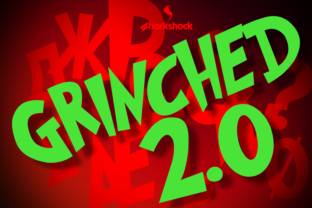
Grinched 2.0: A Practical Typography Tool for Professional Design Workflows
Typography is often the quiet workhorse of any design project. Whether you are building a holiday campaign, formatting a special edition newsletter, or crafting seasonal packaging, the right typeface can carry the entire visual tone. Grinched 2.0 positions itself as more than a novelty font. It is a full-featured typeface that brings extended language support, making it viable for real-world creative and business workflows. This article examines how to integrate Grinched 2.0 into your projects, what its expanded character set means for practical use, and where it fits within a broader production process.
Understanding Grinched 2.0 Beyond the Holiday Label
At first glance, Grinched 2.0 looks like a playful, hand-drawn style that fits seasonal or whimsical projects. However, its engineering goes deeper than most display fonts. The inclusion of European accents, ligatures, Cyrillic characters, and Greek characters transforms it from a niche decorative font into a globally usable asset. If you work with multilingual content, international clients, or localized marketing materials, this level of coverage matters. It saves you from mixing fonts mid-project or manually editing glyphs to fill gaps.
From a process perspective, Grinched 2.0 fits into both the planning and execution stages of a project. During planning, you can evaluate its character coverage and decide whether it will serve a single-language campaign or a multi-region rollout. During execution, the ligatures and alternate characters offer stylistic control without requiring post-production tweaks. This dual relevance makes it a font worth considering even for designers who typically avoid seasonal typefaces.
Where Grinched 2.0 Fits in a Typical Creative Workflow
To understand how Grinched 2.0 interacts with your existing tools and processes, it helps to map out a typical design workflow: research and planning, asset selection, layout and composition, review and revision, and final output. At each stage, the font either simplifies your work or introduces friction. Here is how Grinched 2.0 behaves across that pipeline.
Research and Planning Phase
During initial discovery, you define the visual direction. If your project requires a playful yet readable display font, Grinched 2.0 should appear early in your shortlist. Its extended character set means you do not need to worry about missing accented letters for French, German, Spanish, or other European languages. Similarly, if your content includes Greek or Cyrillic text, you can verify coverage before committing. This reduces the need to swap fonts later, which can disrupt kerning, line height, and overall layout consistency. By planning with Grinched 2.0 from the start, you avoid rework and maintain design coherence across language versions.
Asset Selection and Preparation
Once you have decided on the project scope, you begin gathering assets. Grinched 2.0 can be installed directly into your operating system or synced via font management tools such as Adobe Fonts, FontBase, or RightFont. Because it includes ligatures, you can enable standard ligatures in your design software to automatically replace character pairs with more aesthetically pleasing combinations. This is especially useful for display text where letterform interaction matters. If you work across multiple applications, the font works universally across Adobe Creative Suite, Figma, Affinity products, and web platforms that support custom type. Its compatibility is straightforward, so no special preparation is needed beyond standard installation.
Layout and Composition
When you start placing text, Grinched 2.0 behaves like any well-built OpenType font. You can access stylistic alternates, ligatures, and language-specific glyphs through the Glyphs panel or OpenType menu in your software. For a holiday poster, you might experiment with ligatures to create visually interesting word shapes. For a multilingual brochure, you can switch between Latin, Cyrillic, and Greek characters without leaving the same typeface. This consistency keeps your layouts unified while serving different language groups. If you are an educator preparing multilingual classroom materials, this single-font approach reduces file complexity and makes collaboration easier with colleagues who may not share your font collection.
Practical Implementation Tips for Different Use Cases
Grinched 2.0 is versatile enough to serve multiple industries and project types. Below are concrete examples of how different professionals can integrate it into their workflows.
For Marketers and Campaign Creators
If you produce seasonal email campaigns, landing pages, or social media graphics, Grinched 2.0 works well as a headline font. Because it includes European accents, you can localize subject lines and hero text for French, German, Italian, and other markets without switching typefaces. Pair it with a clean sans-serif body font like Open Sans or Lato to maintain readability. During production, set up a master template that uses Grinched 2.0 for all headlines and CTA text. When localization files arrive, you only need to update the copy, not the font configuration. This streamlines your workflow and reduces the chance of missing characters during translation.
For Freelance Designers and Small Studios
As a freelancer, you often juggle multiple client styles in a single day. Grinched 2.0 fits into a flexible asset library because it covers multiple languages and includes stylistic features that make each project feel distinct. You can create logo mockups, greeting card sets, or merchandise designs with the same font but vary the ligature usage and alternate characters to differentiate deliverables. The Cyrillic and Greek support also opens the door to international clients who need type that respects their alphabet. Instead of hunting for a Cyrillic display font later, you already have one ready. This upfront completeness saves time during client onboarding.
For Publishers and Content Creators
Publishing seasonal special issues, children's books, or branded newsletters requires consistent typography across print and digital. Grinched 2.0 renders well at display sizes and retains legibility when scaled down for subheadings. Its ligature set adds a crafted feel to pull quotes and headlines. When preparing files for print, verify that your printer supports OpenType features and that the font is embedded or outlined correctly. For digital publishing, use standard web font formats (WOFF or WOFF2) and subset the font to include only the language ranges you need. This keeps file sizes small while preserving the character coverage you actually use.
For Educators and Non-Profit Communicators
If you design materials for multilingual classrooms or community organizations, Grinched 2.0 provides a friendly, approachable style that appeals to children and adults alike. You can prepare worksheets, event posters, and instructional handouts without switching fonts between languages. The Greek and Cyrillic support makes it useful for language-learning contexts where students encounter multiple alphabets. In this setting, consistency helps learners focus on content rather than typographic variation. Keep a master document with the font applied, and duplicate it for each language version to maintain uniform spacing and style.
Organizing and Maintaining a Grinched 2.0 Workflow
Long-term use of any font requires attention to organization, compatibility, and quality control. Grinched 2.0 is no different. Here are practical considerations for keeping it productive in your routine.
Font Management and Compatibility
Store Grinched 2.0 in a centralized font library that syncs across your devices. Services like Google Fonts (if available), Adobe Fonts, or self-hosted repositories through FontBase allow you to access the font from any machine. Before starting a project, confirm the font version with any collaborators so everyone works with the same character set. If you share design files with clients or team members, outline the font in your handoff package to avoid missing characters when they open the file without the typeface installed.
Consistency Across Output Formats
When you export designs using Grinched 2.0, check that ligatures and alternate characters render correctly in the target format. PDF exports typically preserve OpenType features, but some web rendering engines may not support all ligature variations. Test your headlines in browser previews before going live. For print, request a proof to confirm that ligatures appear as intended. These small checks prevent surprises and maintain the quality you planned during the layout phase.
Quality Control on Multilingual Projects
With European, Cyrillic, and Greek characters in one font, you have the opportunity to create truly unified multilingual materials. However, double-check that each language version uses the correct glyph forms. Some characters, like Greek accent combinations or Cyrillic italic shapes, require careful placement. Use the Glyphs panel to insert the exact variant you need rather than relying on automatic substitution. Building a multilingual project with Grinched 2.0 can be efficient, but human review of each language version is still essential for professional results.
Observations on Long-Term Value
Grinched 2.0 is not a font you use every day for body copy, but that is not its purpose. Its value lies in being a complete, well-crafted display option that you can reach for when the project calls for personality and multilingual reach. The inclusion of European accents, ligatures, Cyrillic characters, and Greek characters means you are not buying a font for one occasion. You are investing in a tool that can serve recurring seasonal campaigns, international clients, and specialized projects for years. From a workflow efficiency standpoint, that completeness reduces the time spent searching for companion fonts or fixing missing characters at the last minute.
If you organize your font library by language support rather than just style, Grinched 2.0 earns a place in your multilingual folder. When a brief arrives requiring a playful tone across three scripts, you already have a candidate ready. That readiness—the ability to move from planning to layout without procurement delays—is what makes a font truly practical for professionals who value speed and reliability.
Final Practical Advice for Integration
To integrate Grinched 2.0 smoothly into your workflow, start with a low-stakes project. Use it for a single-language newsletter headline or a social media campaign. Learn how its ligatures and alternates behave in your primary design software. Then expand to a bilingual or trilingual piece where you can test the Cyrillic and Greek glyphs. Document any setup steps you discover, such as enabling ligatures or subsetting for web use, so future projects go faster. Over time, Grinched 2.0 becomes a predictable, reliable asset in your typographic toolkit—not because it is trendy, but because it solves real character coverage problems that many display fonts ignore.
By approaching Grinched 2.0 as a functional tool rather than a seasonal novelty, you unlock its full potential across your creative and business processes. Whether you are a marketer coordinating a global campaign, a freelance designer fielding diverse client requests, or an educator preparing accessible materials, this typeface offers the coverage and features that let you focus on the message rather than the mechanics.