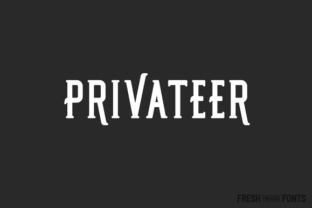
Privateer
You know that moment when you're staring at a header and it just feels… flat. Not wrong, exactly. Just not alive. That familiar tension between wanting to look professional and needing to stand out is where Privateer steps in. This serif display typeface is built around a simple, clever idea: two complete sets of uppercase letters living in one font. One set gives you the clean, classic serif bones you'd trust for a refined title. The other leans into something more ornamental, adding flair without turning into a circus act. And because it includes a full lowercase set, you're not locked into shouting in all-caps either. You can mix, match, and surprise your way through a project.
Two faces, one voice
Think of Privateer as your typographic wardrobe. Some days you reach for a crisp white shirt. Other days, it's a velvet jacket. Here, both options are in the same drawer. The first uppercase set is your reliable go-to: sharp serifs, sturdy proportions, that quiet confidence you'd want for a law firm's annual report or a boutique hotel's main sign. It reads like old money, but not old-fashioned. The second set is where things get interesting. Characters sprout delicate swashes, unexpected curves, and little flourishes that catch the eye without screaming for attention. It's still a serif, still legible, but it carries a sense of occasion.
What makes this practical is that you're not stuck choosing one identity for the whole project. A wedding invitation might use the bare-bones set for the couple's names and the embellished set for "together with their families." A podcast title could keep the core word in the classic style and let the episode number borrow the fancy uppercase. You can even mix within a single word: start with a flourished capital, then drop into the standard uppercase for the rest. It feels custom without the custom price tag.
Where Privateer earns its keep
This font isn't for body text—it's a display face, which means it shines in places where you want people to stop and look. I've seen it used brilliantly on a craft distillery's bottle labels, where the product name sat in the embellished set and the tagline "small batch, big character" ran in the classic uppercase below. The brand felt both rustic and refined. In a very different context, a tech startup used Privateer for their landing page section headers: "About Us" in the standard cut, "Our Mission" in the fancy version, alternating to create a rhythm that felt intentional, not random.
Some real-world scenarios where Privateer pulls its weight:
- Event posters: A film festival flyer used the embellished set for the headliner and the classic set for the schedule grid. It avoided the usual poster chaos where too many fonts fight for attention.
- Book covers: A small poetry press used Privateer for the title and author name, alternating between the two uppercase sets for different lines. Each poem's title inside the book then echoed the same style. It tied the whole cover together.
- Restaurant menus: A brunch spot used the classic uppercase for dish names and the embellished set for the restaurant's name at the top. The menu felt upscale but not pretentious.
- Merchandise: A streetwear brand printed Privateer on hoodies in metallic foil. The mix of plain and fancy caps gave each hoodie a slightly different vibe, making them feel like limited editions.
Who gets the most out of it
Privateer rewards people who enjoy experimenting. If you're a graphic designer working on branding for a local coffee roastery or a wedding stationer, you'll appreciate having two visual tones without switching fonts. But it's also surprisingly useful for non-designers. Small business owners who manage their own marketing can drop Privateer into Canva templates and instantly elevate a social media graphic or a flyer. You don't need to be a typography nerd to feel the difference between a basic header and one that has a little swagger.
Freelancers and solo creators often benefit the most. A photographer's portfolio site, for instance, can use Privateer for the main logo and section titles. The embellished set communicates artistry, while the classic set keeps it professional. A content creator's YouTube thumbnail text can gain a touch of character without looking like a ransom note of competing fonts. Even a newsletter header can feel more intentional when you alternate between the two uppercase styles for the title's letters.
Things to watch for
No tool is perfect for every job, and Privateer has its sweet spot. Because it's a display typeface, it works best at larger sizes—think 24 points and up. At smaller sizes, those lovely flourishes on the alternate set can get muddy, especially on screens with lower resolution. If you're planning to use it on a mobile app or a dense website layout, you'll want to test how it reads at different breakpoints. The classic set stays cleaner at smaller scales, so lean on that for subheaders or smaller titles.
Another consideration: the embellished set is not subtle. It's meant to be noticed. If your brand voice is ultra-minimalist or your audience skews toward no-nonsense industries like engineering or accounting, the fancier caps might feel out of place. That said, you can still use the classic set exclusively and get a beautiful, traditional serif display font. The extra set is a bonus, not a requirement.
Also, legibility is fine for short phrases, but you probably don't want to set a whole paragraph in either uppercase. This is a header and title font. Use it for the spotlight moments, not the supporting cast.
Experimenting without overthinking
One of the best ways to use Privateer is to treat it like a palette of possibilities rather than a fixed look. Start with a word you want to highlight. Type it in all caps using the classic set. Then swap one or two letters to the embellished set. Does it add energy? Does it draw attention to the right syllable? You can also try writing in lowercase for a more approachable feel and only capitalize the first letter using either set. That mix of casual and formal can work well for lifestyle brands or personal blogs.
Another idea: use the embellished set for the first letter of each word in a title, and the classic uppercase for the rest. That gives you a kind of modern old-world look, like a headline from a 1920s newspaper that somehow time-traveled to Instagram. Or go the opposite direction—keep most letters in the classic style, and let the final letter of your title flourish. It creates a natural visual stopping point.
If you're designing a logo, try rendering the brand name entirely in the classic set, then pull one standout letter (like the first or last) into the embellished version. That single letter becomes a subtle mark, almost like a crest or emblem embedded in the word itself.
Strengths that stand out
Privateer's biggest advantage is flexibility. You get two distinct personalities from one font file, which means fewer font licenses, fewer downloads, and less risk of clashing typefaces. It's also genuinely versatile across mediums. It looks natural in print, on screen, in foil stamping, and even in engraved applications like signage or wedding bands. The serifs are sturdy enough that the letterforms hold up when cut in wood or routed in acrylic.
Another strength is that it doesn't feel gimmicky. The embellished set is ornamental, but it stays grounded. It doesn't drift into script territory or get lost in loops. It's still a serif, just one dressed for a party. That means you can use it for serious projects—like a gallery exhibition catalog—without worrying that the typography will undermine the content. And for playful projects, it brings warmth and character without becoming cartoonish.
Limitations worth noting
Privateer is not a workhorse text font. You won't want to set long articles or body copy in it, even at smaller sizes. It's a display face, and that's its lane. Also, the two uppercase sets mean you have fewer lowercase letter variations to play with—there's only one lowercase alphabet. If your project relies heavily on lowercase for the overall look, you'll get less variety than if you were working exclusively with capitals.
Another practical point: some users find the embellished set works best on words with 3–7 letters. Longer words in all embellished caps can start to feel busy, especially if several letters have dramatic swashes. In those cases, it's better to use the classic caps for the long word and let the embellished version highlight a shorter companion word.
Finally, if your audience includes older readers or anyone with visual impairments, test the embellished set at your intended size. The flourishes can sometimes make letters like "M" or "W" read less clearly at a glance. For accessibility, use the classic set for critical information like event dates or product names, and save the fancy letters for decorative contexts.
Privateer rewards curiosity. The more you play with the two uppercase sets, the more you'll discover combinations that feel fresh without feeling forced. It's the kind of typeface that makes you want to try one more version, just to see what happens. And sometimes, that one more version becomes the final choice.